Ed

CoA

Ed's Site

Chivalry

Computers and Tech

Creativity

Pics / Pets

Misc

Made with vi. The RIGHT way!

Hacker Emblem

Linode Powered
Get Firefox!

Rack
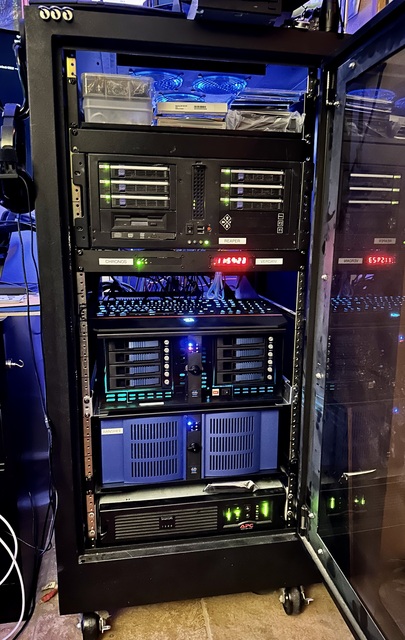
NecroBones.net rackmount goodness.
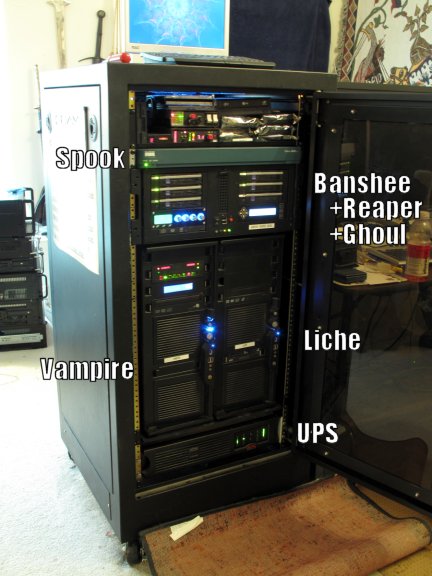
My "mainframe" boxen. (July 2006)


The image to the left is my beastly box of technology, my Mainframe (technically it is a mainframe, since the rack is the "main" frame). It's not the fastest equipment, but it does the job and looks pretty. Even though some of this hardware is a bit on the old side, it's still overkill compared to most of the tasks that these machines are asked to perform.

This is the only environment in which I can truly get away with being a BOFH if I want to. :-) [definition] (They tend to frown on that sort of thing in the work-place)

Despite the relative obsolescence of most of this hardware, it it still lightyears beyond the 286 my BBS ran on.

Notice the "zen boxes". I originally heard the term in college; I have no idea where it originated. I've enjoyed using the term for my blinkenlights for many years now.

Blinkenlights, Click to order!
Click here to get Blinkenlights stuff!

Cray-1
BOXEN

According to The Jargon File, "boxen" is defined as:

Fanciful plural of box often encountered in the phrase 'Unix boxen', used to describe commodity Unix hardware.

MY BOXEN

I know to many of you this'll seem pretty geeky... to others, it'll seem rather dull and ho-hum, or even unimpresive. But just like pet-owners or car enthusiasts, we computer geeks can be rather proud of our chosen passion, even when we haven't invested much money.

I've been into computers to some degree for about 20 years as of this writing, though admittedly early on I was just a kid playing with Basic and a handful of small DOS-based games on an original IBM PC with a 4.77MHz 8088 CPU.

One of the remaining driving forces for me to keep upgrading hardware these days is games, since unlike years ago, other applications aren't quite as dependant on hardware limitations.

However, with periodic upgrades of my main desktop PC, I've always used the left-over parts to build additional machines. In turn, these other boxen have benefitted from the hand-me-down parts with additional upgrades to my workstation. As a result, I have a large number of machines, but they cross the spectrum of the history of my upgrades, and vary in obsolescence.

Even so, they remain useful under linux, and in many cases are still under-utilized. Currently, the slowest "server" in the rack is a dual Pentium2 450MHz machine, which sits idle most of the time. There's an even slower one in there too, but it's not a server. It's configured for DOS, and is merely a 200MHz Pentium-MMX. Also, the box that acts as the network router "appliance" and firewall is a 300MHz Celeron.

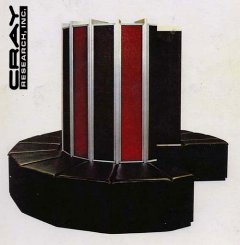
I take great amusement, however, in knowing that even my slower computers, as old and obsolete as they are now compared to current PC hardware, stack up quite nicely in comparison to the super-computers I read about as a kid. Compare the following, for example:

The first Cray-1 Supercomputer, Installed in Los Alamos in 1976:

  • Speed: 133 MFLOPS (peak 250) / 160 MIPS
  • 80 MHz CPU Clock
  • 64-bit Word Size
  • 8 Megabytes RAM (50 ns)
  • Weight: 5.5 Tons including cooling
  • Power: 115 kW excluding cooling
  • Cost: $8.8-Million in 1976 dollars, excluding the disks
   My aging 200-MHz Pentium-MMX (from roughly 1996):

  • Speed: Approximately 25-80 MFLOPS? 200 MIPS?
         (estimates, hard to research)
  • 200 MHz CPU Clock
  • 32-bit Word Size
  • 96 Megabytes RAM (probably 16 originally)
  • Cost: Given to me for free, since it was already obsolete

As you can see, the 200MHz Pentium would have to work longer to accomplish the same tasks as a Cray-1 (particularly when you take into account the optimizations that the Cray had for mathematical and scientific data processing), but similar tasks are within it's reach. At the time that the Pentium was produced, 96 MB of RAM would have been a luxury; However 16 or 32 MB would have been fairly common. I remember using about 48MB in my 150MHz machine for a while before upgrading to a new processor class.

The Cray-1 had over 200,000 logic gates, roughly similar to the Intel 386 from the 1980s. However, the Cray-1's logic was constructed with simple NAND ICs, without a microprocessor chip. (see more on wikipedia).

Yesterday's supercomputer, today's desktop, tomorrow's trash. :)

BOXEN DETAILS

I've debated with myself over how much information to divulge about the nature of my network and my machines, and have waffled back and forth on it. Recently I ended up password-protecting some of my online status pages, but I figure there's not much harm in showing how obsolete my equipment is. :)

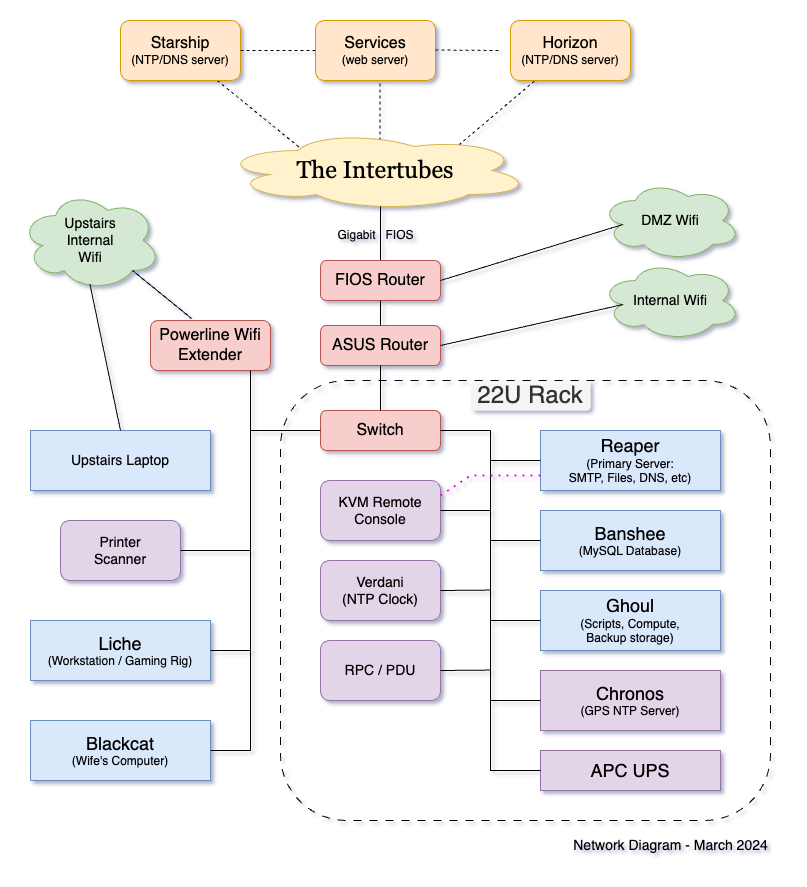
There's also probably little harm in a simple Network Diagram.

The scary thing is that despite how old and "slow" most of the server machines are, I could probably get away with running nearly all of it on a single 200MHz machine (though there are certainly good reasons to compartmentalize funcitons onto separate machines, not the least of which are security and redundancy, and anything running under dosemu will gladly consume an entire CPU).

When you're supporting the network needs of a single person using linux, you generally don't need much hardware at all. Granted, I'm burning more electricity with the multiplicity of hardware, but older machines that are idle will also draw a lot less power than more powerful machines that will be even more idle, even though the newer performance-per-watt figures are superior. The older machines generally had lower idle power consumption.

Rack
Typically not pictured here are Liche and Vampire (desktops).

Reaper

  • 2x AMD Opteron 270 2.0 GHz (4 cores total)
  • Network Services: DHCP, SMTP, HTTP, POP
  • DNS Auth/NS Server
  • DNS Caching Resolver
  • Primary File Server, NFS/SMB, 3+ TB raw storage
  • Weather Station
  • UPS Monitor for rack
  • Configuration manager for LAN, DNS, Router, etc

Banshee

  • AMD Sempron 3000+, 1.6 GHz
  • AT-Robots Server (dosemu) - Down for good?
  • Secondary log host
  • Alternate SSH gateway
  • DNS Auth/NS Server

Ghoul

  • Athlon XP 1600, 1.4 GHz
  • Windows Server
       Weather Radar
       Music Server (iTunes for Roku)

Spook

  • Celeron 300 MHz
  • Router/Firewall "Appliance"
  • Electrical efficiency-- Draws only about 40W continuous.

Mummy (defunct)

  • Dual Pentium2 450 MHz
  • DNS Auth/NS Server
  • Alternate SSH gateway

Zombie

  • Pentium 200 MHz
  • DOS Toy


(1024x768 or better resolution is recommended for this site)

All content Copyright © Ed T. Toton III, All Rights Reserved.
Any and all unauthorized duplication of any content in whole or in part is strictly forbidden.

(A NecroBones® Website)
(NecroBones® is a registered trademark of Ed T. Toton III)